SEO Experts MarketingTechnical SEO checklists, written down plainly

Home / Reference / Structured data

SD 9 checks. Published 2026-10-21, last reviewed 2026-10-21.

Structured data: markup that matches the page

Structured data describes a page in a vocabulary machines can read. Done well it makes a page eligible for richer results. This checklist covers keeping markup accurate, valid and in step with the visible page.

Use it when adding schema.org markup to a template, when rich results disappear, or when a CMS plugin starts generating markup you did not write.

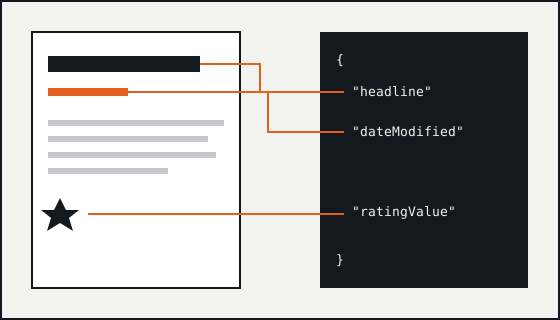
Diagram of a page with a heading, a date and a rating, each linked by a line to the matching property in a JSON-LD block.

Format and vocabulary

SD-01

Prefer JSON-LD.

Why
Google supports JSON-LD, Microdata and RDFa, and recommends JSON-LD because it sits in one block and is easier to maintain at scale.
Verify
List which formats each template emits. Mixed formats describing the same entity are a common source of duplicates.
Failure mode
A theme emits Microdata and a plugin emits JSON-LD for the same article, with different dates.
Sources
Introduction to structured data markup in Google Search
SD-02

Use the most specific type that fits.

Why
Schema.org types form a hierarchy. A specific type, such as a particular kind of article, says more than a generic one, and Google features are defined against specific types.
Verify
Compare the type used with the feature documentation for the result type you are aiming at.
Failure mode
Every page is marked up as a generic Thing or WebPage, so nothing qualifies for a feature.
Sources
General structured data guidelines; Getting started with schema.org using Microdata
SD-03

Fill in every required property, and the recommended ones you can support.

Why
Each Google feature lists required properties. Missing one makes the item ineligible; recommended properties add detail where the content supports it.
Verify
Validate a sample of real pages, not a hand-made test page, and track errors and warnings in Search Console.
Failure mode
A required field is pulled from a CMS field that is empty on older content.
Sources
General structured data guidelines

Accuracy

SD-04

Mark up only content that visitors can see on the page.

Why
Google requires markup to describe the visible content of the page. Marking up text that is hidden, or that belongs on another page, breaks the guidelines.
Verify
For each marked-up value, find the same value on the rendered page.
Failure mode
An aggregate rating appears in the markup but nowhere on the page.
Sources
General structured data guidelines
SD-05

Keep values current and consistent with the page.

Why
Dates, prices, availability and similar values go stale. Markup that contradicts the page misleads searchers and can be ignored.
Verify
Generate markup from the same data source that renders the visible page, rather than maintaining it separately.
Failure mode
dateModified is hard-coded in a template and never changes.
Sources
General structured data guidelines
SD-06

Treat misleading markup as a real risk.

Why
Markup that misrepresents a page can lead to a manual action, which removes rich result eligibility. Self-serving or fake reviews are a common cause.
Verify
Check the Manual Actions report in Search Console after markup changes.
Failure mode
Review markup is added for reviews the business wrote about itself.
Sources
General structured data guidelines; Spam policies for Google web search

Validation and expectations

SD-07

Validate with both a Google and a schema.org tool.

Why
The Rich Results Test shows which Google features a page is eligible for. The Schema Markup Validator checks the markup against the full schema.org vocabulary, including types Google does not use.
Verify
Run both on one URL from each template after any markup change.
Failure mode
Markup passes the general validator but is not eligible for the intended feature because a Google-required field is missing.
Sources
Introduction to structured data markup in Google Search
SD-08

Leave structured data pages crawlable and indexable.

Why
Google can only use markup on pages it can crawl and index. A noindex or robots.txt block makes the markup irrelevant.
Verify
Run the index-controls checks on the templates that carry the markup.
Failure mode
Markup is added to filtered listing pages that are noindex.
Sources
General structured data guidelines
SD-09

Expect eligibility, not a promise of rich results.

Why
Valid markup makes a page eligible for a rich result. Google decides whether to show one, and it may not even when the markup is correct.
Verify
Measure rich result appearance in Search Console reports over time rather than assuming it from validation.
Failure mode
A launch report counts rich results as delivered because the test tool showed no errors.
Sources
General structured data guidelines; Introduction to structured data markup in Google Search

Worked example

An article marked up from the same data the page shows
<script type="application/ld+json">
{
  "@context": "https://schema.org",
  "@type": "TechArticle",
  "headline": "Fixing redirect chains after a platform change",
  "datePublished": "2026-03-02",
  "dateModified": "2026-09-14"
}
</script>
  • The headline and both dates also appear in the visible page.
  • TechArticle is more specific than Article for technical how-to content.
  • Leave out author and publisher properties rather than inventing people or companies that do not exist.

Primary sources for this checklist

These are named rather than linked. Search for the title on the publisher's site to read the current version. Documentation changes, and the source is the authority when it disagrees with this page.

  • Google Search Central Introduction to structured data markup in Google Search
  • Google Search Central General structured data guidelines
  • Schema.org Getting started with schema.org using Microdata
  • Google Search Central Spam policies for Google web search