SEO Experts MarketingTechnical SEO checklists, written down plainly

Home / Reference / Page experience

PX 8 checks. Published 2026-10-21, last reviewed 2026-10-21.

Page experience: Core Web Vitals and the basics around them

Page experience covers how a page feels to use: how fast the main content appears, how quickly it responds and how stable it stays. This checklist covers measuring it properly and keeping it in proportion.

Use it when Search Console reports poor URLs, before a redesign or a new script is added, or when someone proposes a speed project to fix rankings.
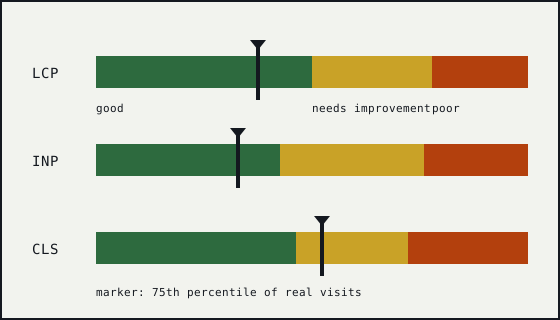
Diagram of three horizontal bars for LCP, INP and CLS, each split into good, needs improvement and poor bands, with a marker at the 75th percentile.

Core Web Vitals

PX-01

Know the three thresholds.

Why
Largest Contentful Paint should be 2.5 seconds or less, Interaction to Next Paint 200 milliseconds or less, and Cumulative Layout Shift 0.1 or less. Each is judged at the 75th percentile of real page loads, separately for mobile and desktop.
Verify
Read the Core Web Vitals report in Search Console, which groups URLs and uses field data.
Failure mode
A team targets an average load time, which hides the slow quarter of visits.
Sources
Web Vitals; Understanding Core Web Vitals and Google search results
PX-02

Measure responsiveness with INP, not FID.

Why
Interaction to Next Paint replaced First Input Delay as the Core Web Vital for responsiveness in March 2024. INP looks at the latency of interactions across the visit, not only the first.
Verify
Check that dashboards, budgets and reports no longer track FID as the responsiveness metric.
Failure mode
A monitoring setup still reports a passing FID while INP is poor.
Sources
Interaction to Next Paint (INP); Web Vitals
PX-03

Judge with field data and debug with lab data.

Why
Field data comes from real visits on real devices and is what the Search Console report uses. Lab tools run one controlled load, which is useful for finding causes but does not represent your visitors.
Verify
When a lab score and the field data disagree, trust the field data for status and use the lab run to look for causes.
Failure mode
A perfect lab score on a fast office connection is reported as the fix while field data is unchanged.
Sources
Web Vitals; Understanding Core Web Vitals and Google search results

Common causes

PX-04

Let the browser find the largest image early.

Why
LCP is often an image. If it is lazy-loaded, injected by script or discovered late from CSS, the browser starts fetching it late.
Verify
Identify the LCP element on key templates and confirm it is in the initial HTML with a normal src, not lazy-loaded.
Failure mode
A carousel script inserts the hero image after the page has loaded.
Sources
Web Vitals
PX-05

Reserve space for anything that loads late.

Why
Layout shifts happen when content arrives without reserved space: images without dimensions, ads, embeds and banners inserted above existing content.
Verify
Set width and height (or an aspect ratio) on images and embeds, and reserve slots for ads and notices.
Failure mode
A cookie or promo bar pushes the whole page down after the first paint.
Sources
Web Vitals
PX-06

Keep long tasks off the main thread during interaction.

Why
INP suffers when a click or tap has to wait for long-running script work before the page can respond.
Verify
Record an interaction in browser developer tools and look for long tasks between the input and the next paint.
Failure mode
A third-party tag runs heavy work on every click.
Sources
Interaction to Next Paint (INP)

Keeping it in proportion

PX-07

Cover the basics: HTTPS, a mobile-friendly layout and no intrusive interstitials.

Why
Google lists these alongside Core Web Vitals as aspects of page experience. They are mostly yes or no, so they are cheap to check.
Verify
Check every template on a narrow viewport and confirm all hosts redirect to HTTPS.
Failure mode
A full-screen sign-up overlay covers the content on mobile as soon as the page opens.
Sources
Understanding page experience in Google Search results
PX-08

Do not expect speed work to outrank relevance.

Why
Google describes page experience as one of many things its systems consider, not a single ranking signal, and says it still shows the most relevant content even when its page experience is weaker.
Verify
Set goals for speed work in terms of visitor experience and Core Web Vitals status, not ranking changes.
Failure mode
A speed project is sold as a ranking fix and judged a failure when positions do not move.
Sources
Understanding page experience in Google Search results; Understanding Core Web Vitals and Google search results

Worked example

Reserving space and loading the main image early
<!-- The likely LCP image: in the HTML, eager, with dimensions -->
<img src="/img/hero-1200.webp" width="1200" height="800"
     fetchpriority="high" alt="Product on a workbench">

<!-- Images further down: lazy, still with dimensions -->
<img src="/img/detail-800.webp" width="800" height="600"
     loading="lazy" alt="Close-up of the hinge">
  • width and height let the browser reserve the right space before the image arrives, which prevents layout shift.
  • The main image is not lazy-loaded, so the browser can request it straight away.
  • fetchpriority is a hint; check the effect in field data rather than assuming it.

Primary sources for this checklist

These are named rather than linked. Search for the title on the publisher's site to read the current version. Documentation changes, and the source is the authority when it disagrees with this page.

  • web.dev Web Vitals
  • Google Search Central Understanding Core Web Vitals and Google search results
  • web.dev Interaction to Next Paint (INP)
  • Google Search Central Understanding page experience in Google Search results