SEO Experts MarketingTechnical SEO checklists, written down plainly

Home / Reference / Index controls

IC 10 checks. Published 2026-10-21, last reviewed 2026-10-21.

Index controls: noindex, canonicals and duplicate URLs

Once a page is crawled, a handful of signals decide whether it is indexed and which URL represents it. This checklist covers using them deliberately and keeping them consistent.

Use it when pages are indexed that should not be, when the wrong URL shows in results, or before launching faceted navigation, filters or a staging environment.

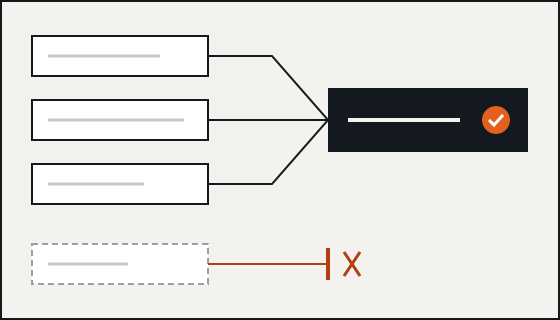
Diagram of three duplicate URL variants pointing to one canonical URL, with a fourth page marked noindex and kept out.

noindex

IC-01

Use a robots meta tag for HTML and the X-Robots-Tag header for everything else.

Why
The meta tag works only in HTML. PDFs, images and other files need the X-Robots-Tag HTTP header to carry the same noindex rule.
Verify
Check response headers for non-HTML files that should stay out of results, not only the HTML templates.
Failure mode
A downloads folder of PDFs is indexed because the noindex was only added to the HTML landing page.
Sources
Block Search indexing with noindex; Robots meta tag, data-nosnippet, and X-Robots-Tag specifications
IC-02

Leave noindex pages crawlable.

Why
Google can only see noindex if it is allowed to fetch the page. Disallowing the same URL in robots.txt hides the rule, and the URL can stay indexed.
Verify
For every template that sets noindex, confirm the path is not disallowed in robots.txt.
Failure mode
Someone adds both noindex and a robots.txt disallow "to be safe", and the pages stay in the index.
Sources
Block Search indexing with noindex; Introduction to robots.txt
IC-03

Remove conflicting robots rules.

Why
When a page carries conflicting robots rules, for example index in one tag and noindex in another, or a different rule in the header, Google applies the more restrictive one.
Verify
Look at the raw HTML, the rendered HTML and the response headers together. Plugins, the CMS and the CDN can each add their own.
Failure mode
A CDN rule adds X-Robots-Tag: noindex to a whole hostname after a staging configuration is copied to production.
Sources
Robots meta tag, data-nosnippet, and X-Robots-Tag specifications
IC-04

Protect staging and preview environments with authentication.

Why
A noindex or a robots.txt block on a staging host relies on everyone keeping it in place, and a blocked host can still have URLs indexed from links. Password protection keeps the content out regardless.
Verify
Request a staging URL without credentials. It should return 401 or 403, not the page.
Failure mode
A staging subdomain is copied to production with its noindex, or production content leaks through an open staging host.
Sources
Block Search indexing with noindex; Introduction to robots.txt

Canonical URLs

IC-05

Give each indexable page one absolute, self-referencing rel=canonical.

Why
rel=canonical tells Google which URL you prefer for a set of duplicate or very similar pages. Absolute URLs avoid ambiguity about protocol and host. The tag goes in the head; for non-HTML files a Link HTTP header does the same job.
Verify
Check that there is exactly one canonical per page, that it is absolute, and that it matches the URL the page is served on.
Failure mode
A template outputs two canonicals, one from the theme and one from a plugin, and both are ignored.
Sources
How to specify a canonical URL with rel="canonical" and other methods; What is URL canonicalization
IC-06

Know that canonical is a strong signal, not a command.

Why
Google combines several signals to choose a canonical. Redirects and rel=canonical are strong signals; listing a URL in a sitemap is a weaker one. If the signals disagree, Google may choose a different URL from the one you declared.
Verify
Use URL Inspection to compare the user-declared canonical with the Google-selected canonical on important pages.
Failure mode
The declared canonical points one way while internal links, sitemaps and redirects all point another.
Sources
How to specify a canonical URL with rel="canonical" and other methods; What is URL canonicalization
IC-07

Make internal links, sitemaps and canonicals agree.

Why
Linking internally to the canonical form (one protocol, one host, one trailing-slash style) reinforces the choice. Google also prefers HTTPS URLs over HTTP when choosing among duplicates.
Verify
Crawl the site and list every internal link that points to a non-canonical variant: http, a different host, a missing slash or a tracking parameter.
Failure mode
Navigation links to URLs without the trailing slash, so every click and every crawl goes through a redirect.
Sources
What is URL canonicalization; How to specify a canonical URL with rel="canonical" and other methods
IC-08

Do not use robots.txt or noindex to choose a canonical within a site.

Why
Blocking a duplicate in robots.txt stops Google from seeing it is a duplicate at all. Google also advises against using noindex to steer canonical selection within one site; rel=canonical or redirects are the intended tools.
Verify
Review how parameter, print and sort variants are handled and replace blocks with canonicals or redirects where the goal is consolidation.
Failure mode
Sort-order URLs are disallowed, so their links and signals never consolidate into the main listing.
Sources
How to specify a canonical URL with rel="canonical" and other methods
IC-09

Keep the canonical the same in the raw and rendered HTML.

Why
If JavaScript rewrites the canonical after load, Google can see two different values. Google recommends not using JavaScript to change the canonical to something different from the one in the original HTML.
Verify
Compare the canonical in the server response with the one in the rendered HTML from URL Inspection.
Failure mode
A client-side router updates the canonical on navigation but the server always sends the home page canonical.
Sources
Understand JavaScript SEO basics; How to specify a canonical URL with rel="canonical" and other methods

Snippet controls

IC-10

Use snippet controls narrowly.

Why
Rules such as nosnippet and max-snippet, and the data-nosnippet attribute on specific elements, change what can appear in a result without removing the page. Applied site-wide, they can make results less useful to searchers.
Verify
List every page or element with a snippet rule and confirm each has a reason, such as legal text or volatile pricing.
Failure mode
A max-snippet:0 left over from a test removes descriptions across the site.
Sources
Robots meta tag, data-nosnippet, and X-Robots-Tag specifications

Worked example

The same signals in a page head and in a response header
<!-- An indexable page that names itself as canonical -->
<link rel="canonical" href="https://www.example.com/guides/widgets/">
<meta name="robots" content="index, follow">

# A PDF kept out of results, set in the HTTP response
X-Robots-Tag: noindex
  • index, follow is the default, so the meta tag is optional. Writing it out makes audits easier to read.
  • The canonical uses the full origin and the trailing slash the site actually serves.
  • The header form is the only way to put noindex on a file that is not HTML.

Primary sources for this checklist

These are named rather than linked. Search for the title on the publisher's site to read the current version. Documentation changes, and the source is the authority when it disagrees with this page.

  • Google Search Central Block Search indexing with noindex
  • Google Search Central Robots meta tag, data-nosnippet, and X-Robots-Tag specifications
  • Google Search Central Introduction to robots.txt
  • Google Search Central How to specify a canonical URL with rel="canonical" and other methods
  • Google Search Central What is URL canonicalization
  • Google Search Central Understand JavaScript SEO basics