SEO Experts MarketingTechnical SEO checklists, written down plainly

Home / Reference / Crawl access

CA 15 checks. Published 2026-10-21, last reviewed 2026-10-21.

Crawl access: robots.txt, status codes and discovery

Before a page can be indexed, a crawler has to find its URL, be allowed to fetch it and get a meaningful response. This checklist covers the controls that decide each of those steps.

Use it when launching a site, changing hosting or a CDN, editing robots.txt, or investigating pages that are discovered but not crawled.

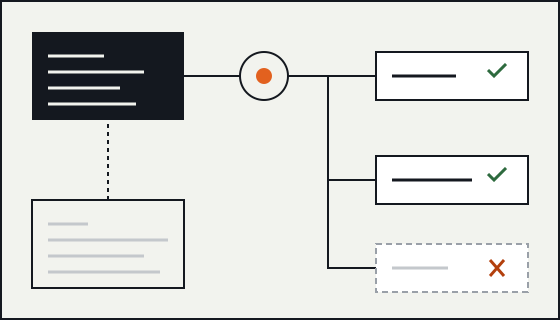
Diagram of a crawler reading robots.txt at the root of one host, then fetching allowed paths and skipping a disallowed one.

robots.txt: scope and parsing

CA-01

Serve robots.txt at the root of every host and protocol you care about.

Why
A robots.txt file only applies to the exact protocol, host and port it is served from. Rules on www.example.com do nothing for shop.example.com or for the http version of the same host.
Verify
Request /robots.txt on each hostname and protocol in use, including subdomains served by other platforms.
Failure mode
A subdomain on a separate platform has no file, or an old file, and nobody notices because the main host looks correct.
Sources
How Google interprets the robots.txt specification; RFC 9309: Robots Exclusion Protocol
CA-02

Make robots.txt return 200 with text/plain, and know what other status codes mean.

Why
Google treats 4xx responses for robots.txt (other than 429) as if no file exists, so everything may be crawled. Server errors and 429 are treated as a temporary block on the whole host. Redirects are followed for a limited number of hops.
Verify
Fetch the file without a cache and check the status line, the content type and any redirect chain.
Failure mode
A firewall or CDN rule returns 403 or 503 to crawlers only, which either opens or closes the whole site without anyone editing the file.
Sources
How Google interprets the robots.txt specification; How HTTP status codes, and network and DNS errors affect Google Search
CA-03

Keep the file small and plain.

Why
Google stops reading robots.txt after 500 kibibytes and ignores the remainder. RFC 9309 also sets 500 kibibytes as the minimum a crawler must parse.
Verify
Check the byte size. If the file is anywhere near the limit, the rules are probably listing URLs that should be handled another way.
Failure mode
A generated file lists thousands of individual paths and the rules at the end are silently dropped.
Sources
How Google interprets the robots.txt specification; RFC 9309: Robots Exclusion Protocol
CA-04

Understand which group and which rule wins.

Why
A crawler follows only the most specific user-agent group that matches it, not a merge of all groups. Within that group, the most specific (longest) matching path wins, and when an allow and a disallow rule are equally specific, Google uses the less restrictive one.
Verify
Read the file as one crawler would: find its group, then test sample URLs against that group alone. Search Console has a robots.txt report for the hosts you have verified.
Failure mode
A Googlebot group is added for one exception and the site-wide disallow rules in the * group stop applying to Googlebot.
Sources
How Google interprets the robots.txt specification; RFC 9309: Robots Exclusion Protocol

robots.txt: what it does not do

CA-05

Do not use robots.txt to keep a page out of the index.

Why
Disallow controls crawling, not indexing. A disallowed URL can still be indexed from links pointing at it, usually without a description. To keep a page out of results it has to be crawlable and carry noindex, or sit behind authentication.
Verify
For every disallowed path, ask whether the goal is saving crawl effort (robots.txt is fine) or hiding the page (it is not).
Failure mode
A private section is disallowed, gets linked from elsewhere, and appears in results as a bare URL.
Sources
Introduction to robots.txt; Block Search indexing with noindex
CA-06

Do not block the CSS, JavaScript or images a page needs to render.

Why
Google renders pages to understand them. If the resources that build the layout or load the main content are disallowed, the rendered page Google sees can differ from what visitors see.
Verify
Use the URL Inspection tool in Search Console to view the rendered HTML and the list of resources that could not be loaded.
Failure mode
A legacy rule such as Disallow: /assets/ hides the bundle that renders the product grid.
Sources
Introduction to robots.txt; Understand JavaScript SEO basics
CA-07

Remove rules Google does not support.

Why
Google ignores crawl-delay, and it does not support noindex inside robots.txt. Leaving them in creates a false sense of control.
Verify
List every field in the file and compare it with the fields Google documents: user-agent, allow, disallow and sitemap.
Failure mode
A team believes a noindex line in robots.txt is hiding a section, years after that stopped working.
Sources
How Google interprets the robots.txt specification

Responses, links and rendering

CA-08

Return a real 404 or 410 for content that is gone.

Why
Both codes tell Google the URL has no content, and the URL drops out of the index over time. A "not found" message served with 200 is a soft 404: it wastes crawling and can be reported as an error.
Verify
Request a made-up URL on every template type (article, category, search, product) and check the status code, not just the page text.
Failure mode
A JavaScript app shows a friendly error but the server returns 200 for every path.
Sources
How HTTP status codes, and network and DNS errors affect Google Search; Understand JavaScript SEO basics
CA-09

Watch server errors and rate limiting.

Why
Responses in the 5xx range and 429 tell Google to slow down. If they persist, URLs that keep failing can be dropped from the index.
Verify
Check server logs and the Crawl Stats report for 5xx and 429 responses served to crawlers, including from bot protection.
Failure mode
Bot protection rate-limits Googlebot during a busy period and crawling falls off for days.
Sources
How HTTP status codes, and network and DNS errors affect Google Search
CA-10

Make every navigational link an a element with an href.

Why
Google reliably follows links that are a elements with a resolvable URL in href. Elements that only navigate through a click handler are not treated as links.
Verify
View the rendered HTML of the main templates and confirm menus, pagination and "load more" controls expose real href values.
Failure mode
Pagination is a set of buttons, so pages two onward are never discovered except through the sitemap.
Sources
Link best practices for Google; Understand JavaScript SEO basics
CA-11

Make sure the main content exists in the rendered HTML.

Why
Google renders JavaScript with a current version of Chromium, but rendering can be deferred and content that needs a user action (a click, a scroll past an event, a login) is not seen.
Verify
Compare the response HTML, the rendered HTML in URL Inspection and the visible page. Important text, links and metadata should be in the rendered version without interaction.
Failure mode
Product descriptions load only after a tab is clicked.
Sources
Understand JavaScript SEO basics

Discovery with XML sitemaps

CA-12

List only canonical, indexable URLs in the sitemap.

Why
A sitemap is a hint about which URLs you consider canonical. Listing redirects, noindex pages or duplicates sends mixed signals.
Verify
Fetch every URL in the sitemap and confirm each returns 200, is not noindex and has a self-referencing canonical.
Failure mode
The sitemap is generated from the database and still lists retired URLs that now redirect.
Sources
Build and submit a sitemap; How to specify a canonical URL with rel="canonical" and other methods
CA-13

Respect the size limits and use a sitemap index for more.

Why
A single sitemap file is limited to 50,000 URLs or 50 MB uncompressed. Larger sites split the list and reference the parts from a sitemap index file.
Verify
Count URLs and measure the uncompressed size of each file.
Failure mode
One file passes the limit and is rejected as a whole.
Sources
Build and submit a sitemap; Sitemaps XML format
CA-14

Keep lastmod honest and skip priority and changefreq.

Why
Google says it ignores priority and changefreq. It uses lastmod when the value is consistently accurate, meaning it changes when the main content changes, not on every deploy.
Verify
Compare lastmod values with real content changes on a sample of pages.
Failure mode
Every URL carries the build date, so the field carries no information.
Sources
Build and submit a sitemap
CA-15

Point to the sitemap from robots.txt with an absolute URL, and submit it in Search Console.

Why
The Sitemap field in robots.txt lets any crawler find the file. Submitting it in Search Console adds reporting on how it was processed.
Verify
Check that the Sitemap line uses the full canonical origin and that the file is reachable at that exact URL.
Failure mode
The Sitemap line still points at a staging hostname.
Sources
Build and submit a sitemap; How Google interprets the robots.txt specification

Worked example

A small robots.txt, read the way a crawler reads it
# Applies to every crawler without a more specific group
User-agent: *
Disallow: /search/
Disallow: /cart/
Allow: /search/help/

Sitemap: https://www.example.com/sitemap.xml
  • A crawler that matches no named group uses the * group.
  • /search/help/ is crawlable because the Allow rule is the longer, more specific match.
  • Nothing here removes /cart/ from the index if other sites link to it. That needs noindex or authentication.

Primary sources for this checklist

These are named rather than linked. Search for the title on the publisher's site to read the current version. Documentation changes, and the source is the authority when it disagrees with this page.

  • Google Search Central How Google interprets the robots.txt specification
  • IETF (RFC Editor) RFC 9309: Robots Exclusion Protocol
  • Google Search Central How HTTP status codes, and network and DNS errors affect Google Search
  • Google Search Central Introduction to robots.txt
  • Google Search Central Block Search indexing with noindex
  • Google Search Central Understand JavaScript SEO basics
  • Google Search Central Link best practices for Google
  • Google Search Central Build and submit a sitemap
  • Google Search Central How to specify a canonical URL with rel="canonical" and other methods
  • sitemaps.org Sitemaps XML format