SEO Experts MarketingTechnical SEO checklists, written down plainly

Home / Reference / Redirects and migrations

RM 10 checks. Published 2026-10-21, last reviewed 2026-10-21.

Redirects and migrations: moving URLs without losing them

Every time a URL changes, something has to tell browsers and crawlers where the content went. This checklist covers choosing the right redirect and running a migration so old URLs keep resolving.

Use it before changing a URL structure, moving to a new domain or platform, switching to HTTPS, or consolidating several sites into one.

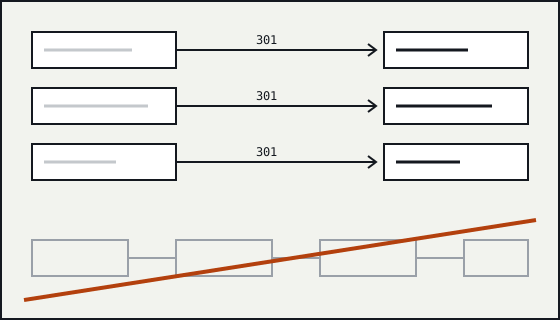
Diagram of old URLs on the left mapped one to one onto new URLs on the right, with a crossed-out chain of three hops.

Choosing the redirect

RM-01

Use a server-side permanent redirect (301 or 308) for permanent moves.

Why
Google treats a permanent redirect as a strong signal that the target should be the canonical. A temporary redirect (302 or 307) is a weaker signal and the old URL is more likely to stay in results.
Verify
Request each old URL and check the status code and Location header, not just where the browser ends up.
Failure mode
A platform sends 302 by default and the old URLs stay indexed for months.
Sources
Redirects and Google Search
RM-02

Use meta refresh and JavaScript redirects only when the server cannot redirect.

Why
Google treats an instant meta refresh as permanent and a delayed one as temporary. A JavaScript redirect works only if the page is rendered, so it is the last option.
Verify
Check whether the hosting platform supports server-side rules before falling back to page-level redirects.
Failure mode
A static host is assumed to lack redirects, when a redirects file is supported.
Sources
Redirects and Google Search
RM-03

Keep chains to a single hop.

Why
Googlebot follows a limited number of redirect hops (Google documents up to 10) before giving up on a URL, and every hop adds latency for visitors.
Verify
Run the full old-URL list through a checker that records each hop, and rewrite rules so every old URL goes straight to its final target.
Failure mode
http to https, then non-www to www, then old path to new path: three hops for every legacy link.
Sources
How HTTP status codes, and network and DNS errors affect Google Search; Redirects and Google Search

Planning the map

RM-04

Map each old URL to its closest equivalent new URL.

Why
A one-to-one map keeps relevance. Sending many unrelated URLs to the home page gives visitors nothing useful, and Google can treat those redirects like soft 404s.
Verify
Build the map as a two-column file, old to new, and review every row where many old URLs share one target.
Failure mode
Every retired product redirects to the home page.
Sources
Site moves with URL changes; How HTTP status codes, and network and DNS errors affect Google Search
RM-05

Build the old URL list from several sources.

Why
No single source has every URL that matters. Combining the old sitemap, a crawl, server logs and pages with external links catches URLs a crawl alone misses.
Verify
Record the count from each source and the merged, de-duplicated total in the migration notes.
Failure mode
The map comes from a crawl of the current navigation and misses the old campaign pages that still have links.
Sources
Site moves with URL changes
RM-06

Update everything that names a URL, not only the redirects.

Why
Internal links, canonicals, hreflang annotations and sitemaps should all point at the new URLs, so the redirects are a safety net rather than the main signal.
Verify
After launch, crawl the new site and list any internal link or canonical that still points at an old URL.
Failure mode
The new templates still hard-code canonicals to the old domain.
Sources
Site moves with URL changes; How to specify a canonical URL with rel="canonical" and other methods

Launch and after

RM-07

Do not block the old URLs in robots.txt.

Why
Google has to crawl an old URL to see its redirect. Disallowing the old paths hides the redirects and slows the move.
Verify
Check the robots.txt on the old host after launch.
Failure mode
A "site closed" robots.txt with Disallow: / is left on the old domain.
Sources
Site moves with URL changes; Introduction to robots.txt
RM-08

For a domain change, use the Change of Address tool in Search Console.

Why
The tool tells Google about a move from one domain to another. It requires both properties to be verified and the redirects to be live.
Verify
Verify the old and new properties before launch so the tool is ready to use on the day.
Failure mode
Nobody has access to the old property when the move happens.
Sources
Site moves with URL changes
RM-09

Keep redirects in place for at least a year, and longer if you can.

Why
Google recommends keeping redirects for as long as possible and generally at least one year. Links from other sites keep using the old URLs long after that.
Verify
Record the redirect rules in version control with the date they went live and a review date.
Failure mode
Redirects are removed with the old server six months later.
Sources
Site moves with URL changes
RM-10

Re-check the full old URL list after launch and record the result.

Why
A launch-day check catches rules that were never deployed, ordering mistakes and environment differences that a staging test could not show.
Verify
Request every old URL on production, store status and final URL, and fix any that do not end in a single 301 or 308 to a 200.
Failure mode
The redirect file works on staging but the production server reads a different file.
Sources
Site moves with URL changes; Redirects and Google Search

Worked example

A redirect map row by row
old_url,new_url,status,note
/products/blue-widget.html,/widgets/blue/,301,direct equivalent
/products/widget-sale-2019.html,/widgets/,301,closest category
/about-us.php,/about/,301,direct equivalent
/press/2014-launch.html,,410,no equivalent; gone on purpose
  • Each row is one old URL with one final target, so no chains are created.
  • A URL with no sensible equivalent is retired with 410 rather than sent to the home page.
  • The note column records why, which saves the next person from guessing.

Primary sources for this checklist

These are named rather than linked. Search for the title on the publisher's site to read the current version. Documentation changes, and the source is the authority when it disagrees with this page.

  • Google Search Central Redirects and Google Search
  • Google Search Central How HTTP status codes, and network and DNS errors affect Google Search
  • Google Search Central Site moves with URL changes
  • Google Search Central How to specify a canonical URL with rel="canonical" and other methods
  • Google Search Central Introduction to robots.txt